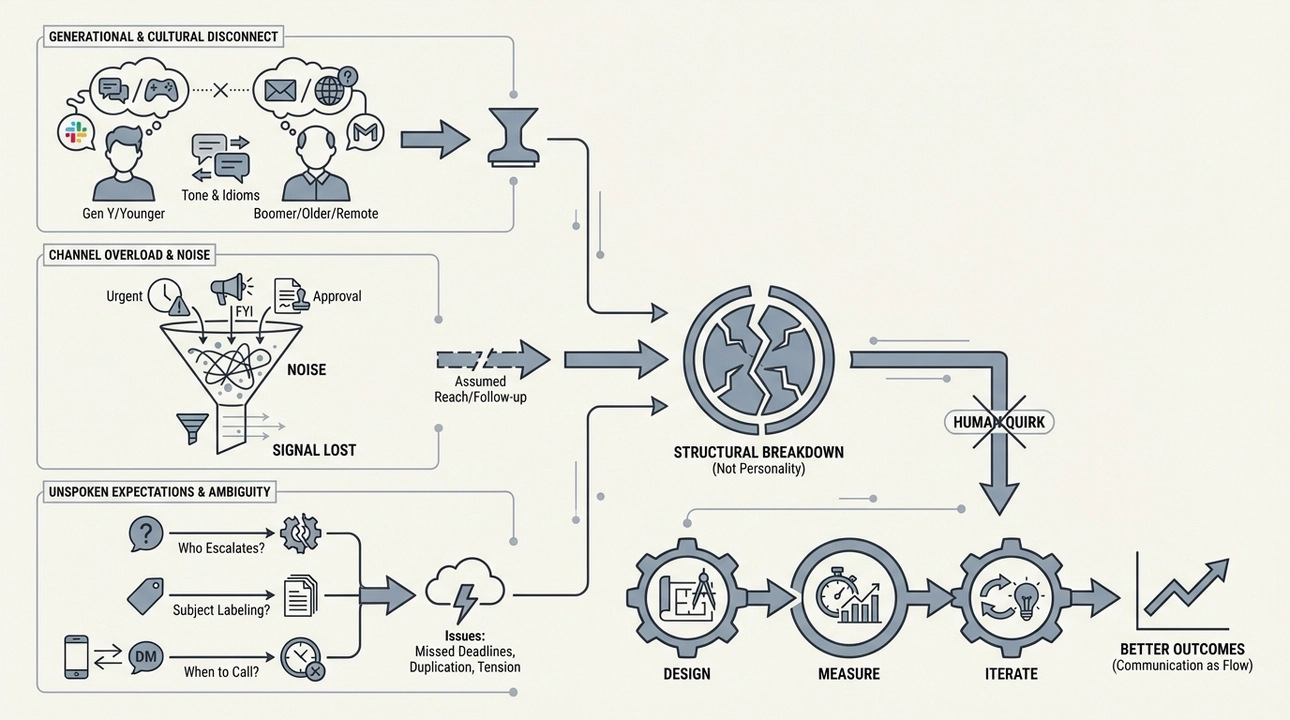
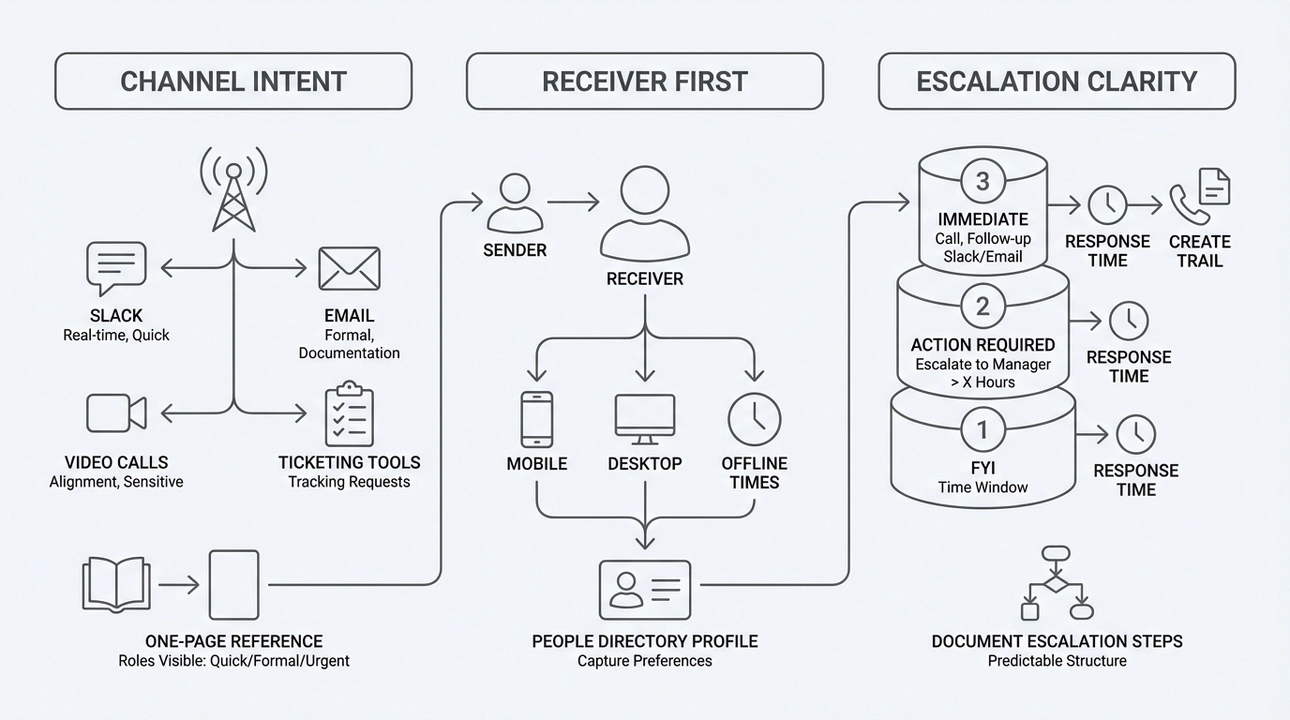
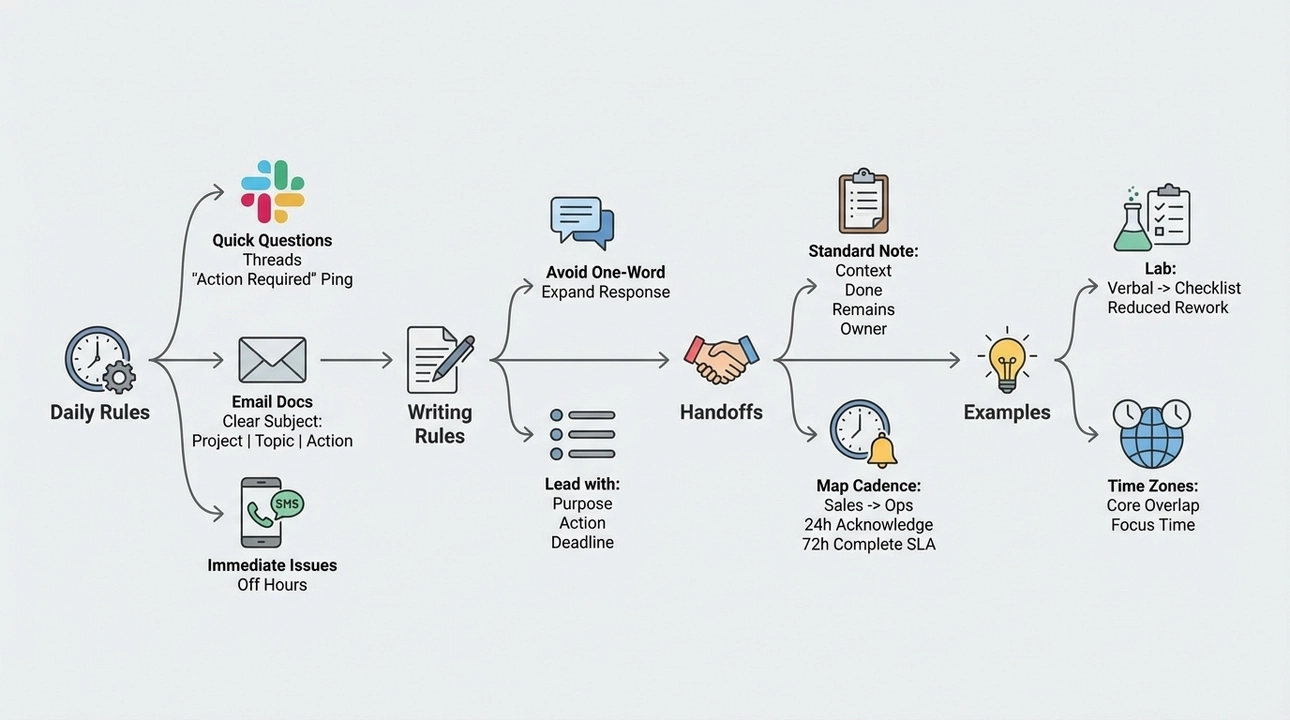
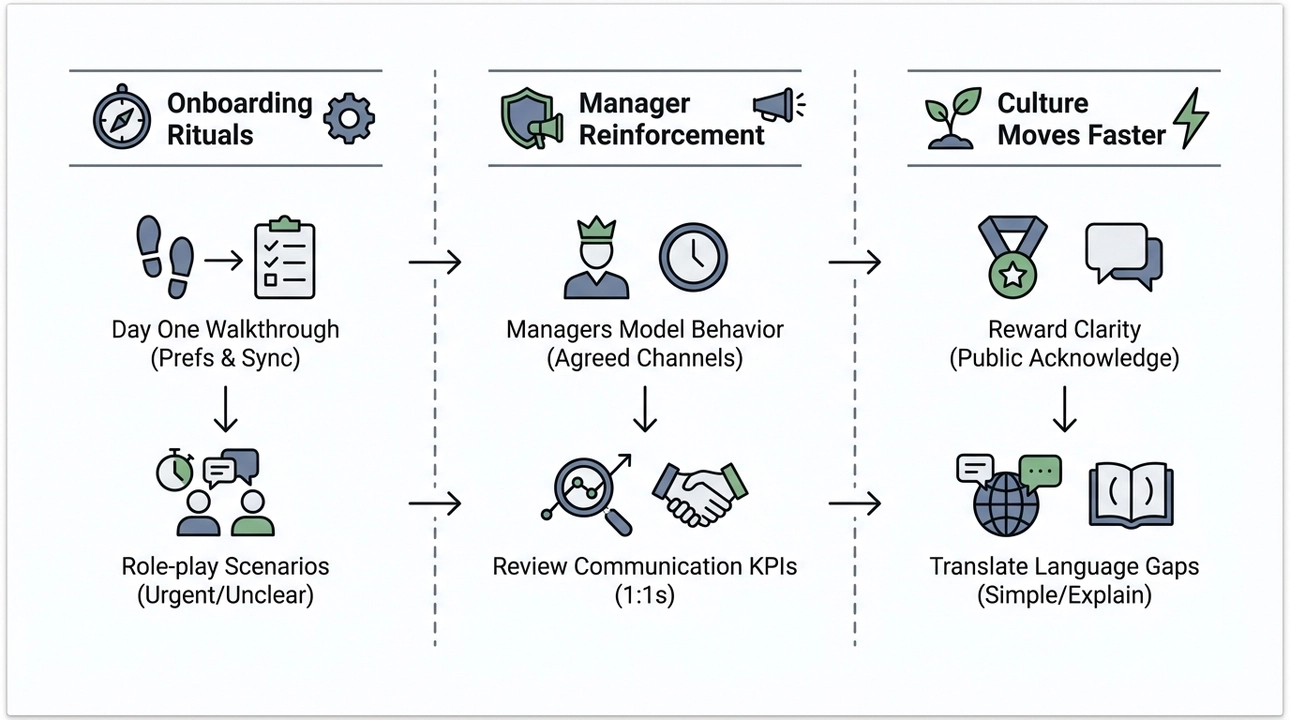
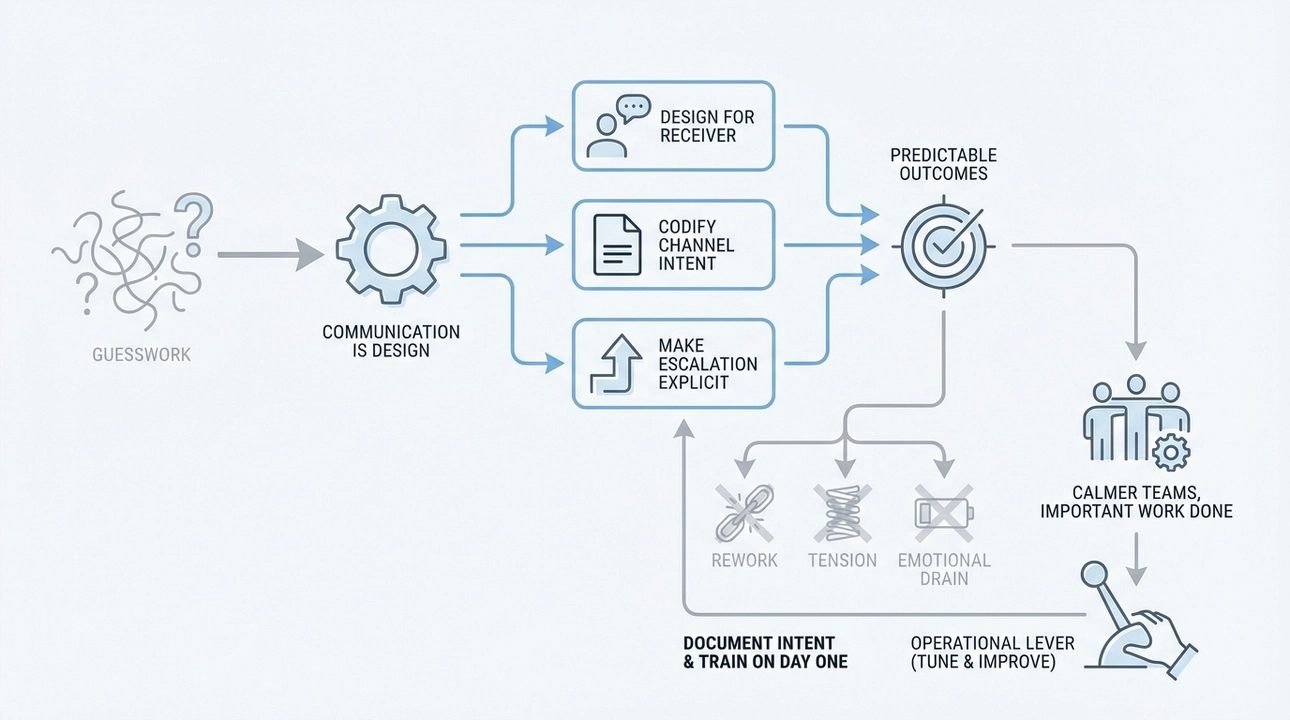
{"json":{"type":"doc","content":[{"type":"image","attrs":{"src":"https://server.onli.bio/files/onliweb/62403433d571904475b7c87167a6110e_post-1771021876451.lg.webp","alt":null,"title":null,"caption":"","thumbnail":null}},{"type":"paragraph","content":[{"type":"text","text":"I have lost work to a misunderstood ask more times than I care to remember. One simple phone conversation with my boss once turned into a day of firefighting because I assumed everyone interpreted a short instruction the same way I did. That shock stuck with me. Over the years I built a different habit: I design communication workflows before I design processes. If you lead teams, run operations, or are rolling out cultural change, your systems will fail without clear rules about how people share and receive information. This is why communication is not a soft skill; it is the operational backbone that keeps work from falling into the cracks."}]},{"type":"diagramImageNode","attrs":{"src":"https://server.onli.bio/files/onliweb/a38fcf004af8a48fc55eab4067255081_diagram-1771025006194.png","prompt":"Why communication is the hidden failure mode People assume others communicate the way they do. That assumption is where most breakdowns begin. I see three consistent patterns in organizations that struggle: - Generational differences shape preferred channels and tone. A Gen Y teammate may treat Slack like a live conversation, while a Boomer colleague prefers email for record keeping. Immigrants or remote hires bring regional idioms that don’t always translate, and younger staff use cultural references or game metaphors that older staff do not follow. - Channel overload creates noise. When urgent messages, FYIs, and formal approvals all arrive in the same places, people develop filters that hide the signal. The sender assumes reach; the receiver assumes follow-up. - Unspoken expectations. Teams rarely document who escalates, how to label subjects, or when to switch from DM to call. That ambiguity surfaces as missed deadlines, duplicated work, or tension in meetings. Those issues are not about personality. They are structural. When I run operations, I stop treating communication as a human quirk and treat it as a flow to design, measure, and iterate.","caption":"Communication breakdowns: Generational, channel overload, unspoken expectations.","styleType":"custom","status":"success","thumbnail":null}},{"type":"heading","attrs":{"level":2},"content":[{"type":"text","text":"Why communication is the hidden failure mode"}]},{"type":"paragraph","content":[{"type":"text","text":"People assume others communicate the way they do. That assumption is where most breakdowns begin. I see three consistent patterns in organizations that struggle:"}]},{"type":"bulletList","attrs":{"tight":true},"content":[{"type":"listItem","content":[{"type":"paragraph","content":[{"type":"text","text":"Generational differences shape preferred channels and tone. A Gen Y teammate may treat Slack like a live conversation, while a Boomer colleague prefers email for record keeping. Immigrants or remote hires bring regional idioms that don’t always translate, and younger staff use cultural references or game metaphors that older staff do not follow."}]}]},{"type":"listItem","content":[{"type":"paragraph","content":[{"type":"text","text":"Channel overload creates noise. When urgent messages, FYIs, and formal approvals all arrive in the same places, people develop filters that hide the signal. The sender assumes reach; the receiver assumes follow-up."}]}]},{"type":"listItem","content":[{"type":"paragraph","content":[{"type":"text","text":"Unspoken expectations. Teams rarely document who escalates, how to label subjects, or when to switch from DM to call. That ambiguity surfaces as missed deadlines, duplicated work, or tension in meetings."}]}]}]},{"type":"paragraph","content":[{"type":"text","text":"Those issues are not about personality. They are structural. When I run operations, I stop treating communication as a human quirk and treat it as a flow to design, measure, and iterate."}]},{"type":"paragraph"},{"type":"diagramImageNode","attrs":{"src":"https://server.onli.bio/files/onliweb/429282fc971ccac46bb1a3b3a6363f2a_diagram-1771028952024.png","prompt":"A simple framework I use to design communication workflows I follow three pillars when I set up communication systems: Channel Intent, Receiver First, and Escalation Clarity. Each pillar maps to concrete design choices. Channel Intent - Define the purpose of each channel. For example: Slack for real-time coordination and quick clarifications, email for external correspondence and official documentation, video calls for alignment and sensitive topics, and ticketing tools for tracking requests. - Make channel roles visible. Create a one page reference everyone can access that states: Slack equals quick, informal; Email equals formal and attach documents; Phone equals urgent and requires immediate attention. Receiver First - Decide communication for the person who needs to receive, not for the sender. Ask: how does the recipient prefer to be reached and where will they see this most reliably? - Capture preferences in onboarding. I ask new hires how they prefer notifications, whether they use mobile or desktop, and what times they are offline. This becomes part of their profile in our people directory. Escalation Clarity - Define urgency levels and the action expected. I use three tiers: FYI, Action Required, and Immediate. Each tier maps to a channel and a response time window. - Document escalation steps. If an Action Required item goes unanswered in X hours, escalate to the manager. If Immediate, call and then follow up in Slack and email to create a trail. Implementing these pillars means designing rules, not policing personalities. It lets people work with their styles inside a predictable structure.","caption":"Communication workflow: Channel, Receiver, Escalation.","styleType":"custom","status":"success","thumbnail":null}},{"type":"heading","attrs":{"level":2},"content":[{"type":"text","text":"A simple framework I use to design communication workflows"}]},{"type":"paragraph","content":[{"type":"text","text":"I follow three pillars when I set up communication systems: Channel Intent, Receiver First, and Escalation Clarity. Each pillar maps to concrete design choices."}]},{"type":"paragraph","content":[{"type":"text","marks":[{"type":"bold"}],"text":"Channel Intent"}]},{"type":"paragraph","content":[{"type":"text","text":"- Define the purpose of each channel. For example: Slack for real-time coordination and quick clarifications, email for external correspondence and official documentation, video calls for alignment and sensitive topics, and ticketing tools for tracking requests."}]},{"type":"paragraph","content":[{"type":"text","text":"- Make channel roles visible. Create a one page reference everyone can access that states: Slack equals quick, informal; Email equals formal and attach documents; Phone equals urgent and requires immediate attention."}]},{"type":"paragraph","content":[{"type":"text","marks":[{"type":"bold"}],"text":"Receiver First"}]},{"type":"paragraph","content":[{"type":"text","text":"- Decide communication for the person who needs to receive, not for the sender. Ask: how does the recipient prefer to be reached and where will they see this most reliably?"}]},{"type":"paragraph","content":[{"type":"text","text":"- Capture preferences in onboarding. I ask new hires how they prefer notifications, whether they use mobile or desktop, and what times they are offline. This becomes part of their profile in our people directory."}]},{"type":"paragraph","content":[{"type":"text","marks":[{"type":"bold"}],"text":"Escalation Clarity"}]},{"type":"paragraph","content":[{"type":"text","text":"- Define urgency levels and the action expected. I use three tiers: FYI, Action Required, and Immediate. Each tier maps to a channel and a response time window."}]},{"type":"paragraph","content":[{"type":"text","text":"- Document escalation steps. If an Action Required item goes unanswered in X hours, escalate to the manager. If Immediate, call and then follow up in Slack and email to create a trail."}]},{"type":"paragraph","content":[{"type":"text","text":"Implementing these pillars means designing rules, not policing personalities. It lets people work with their styles inside a predictable structure."}]},{"type":"diagramImageNode","attrs":{"src":"https://server.onli.bio/files/onliweb/66937fa44e33e7cbe59db487cdca8ad2_diagram-1771029010573.png","prompt":"Practical rules and examples I implement with teams When I joined teams as an operations lead, I found that small, explicit rules change behavior far faster than long manuals. Below are rules I share and enforce early in an engagement. Daily operating rules - Quick questions in Slack. Use threads to keep channels readable. If something needs an answer in less than two hours, mark it Action Required and ping the person directly. - Email for documents and external communication. Always use a clear subject line structured like: ProjectName | Topic | Action Required or FYI. That format forces the sender to think about intent. - Phone and SMS for immediate issues outside business hours. If you receive a call during off hours, treat it as Immediate unless told otherwise by the contact. Writing rules that save time - Avoid one word replies when the ask could be interpreted multiple ways. A short expansion stops assumptions, for example: Yes, I can do X by 3pm and will update the doc in folder Y. That simple phrase eliminates follow-up questions. - Use the sentence at the top of emails and long messages that states purpose, action required, and deadline. Lead with: Purpose, Required action, By when. Handling cross-team handoffs - Standardize the handoff note. I ask teams to use a template for handoffs that includes context, what was done, what remains, and who owns the next steps. Put that as the first section of an email or ticket. - Map a notification cadence. For example, when Sales sends a client onboarding request to Operations, tag it as Onboarding Request and route to the intake queue. Assign a 24 hour SLA for acknowledgment and a 72 hour SLA for completion. Examples from real situations - When a lab technician misunderstood a verbal instruction, we changed to a mandatory checklist sent via ticketing tool for all procedures. The checklist required the technician to confirm specific parameters. The result: the number of rework incidents dropped dramatically. - When teams across time zones were missing each other, we set core hours for overlap and moved brainstorming sessions to those windows. For deep work, we blocked focus time where notifications are deferred.","caption":"Team rules: Streamlining workflows, saving time, improving handoffs.","styleType":"custom","status":"success","thumbnail":null}},{"type":"heading","attrs":{"level":2},"content":[{"type":"text","text":"Practical rules and examples I implement with teams"}]},{"type":"paragraph","content":[{"type":"text","text":"When I joined teams as an operations lead, I found that small, explicit rules change behavior far faster than long manuals. Below are rules I share and enforce early in an engagement."}]},{"type":"paragraph","content":[{"type":"text","marks":[{"type":"bold"}],"text":"Daily operating rules"}]},{"type":"paragraph","content":[{"type":"text","text":"- Quick questions in Slack. Use threads to keep channels readable. If something needs an answer in less than two hours, mark it Action Required and ping the person directly."}]},{"type":"paragraph","content":[{"type":"text","text":"- Email for documents and external communication. Always use a clear subject line structured like: ProjectName | Topic | Action Required or FYI. That format forces the sender to think about intent."}]},{"type":"paragraph","content":[{"type":"text","text":"- Phone and SMS for immediate issues outside business hours. If you receive a call during off hours, treat it as Immediate unless told otherwise by the contact."}]},{"type":"paragraph","content":[{"type":"text","marks":[{"type":"bold"}],"text":"Writing rules that save time"}]},{"type":"paragraph","content":[{"type":"text","text":"- Avoid one word replies when the ask could be interpreted multiple ways. A short expansion stops assumptions, for example: Yes, I can do X by 3pm and will update the doc in folder Y. That simple phrase eliminates follow-up questions."}]},{"type":"paragraph","content":[{"type":"text","text":"- Use the sentence at the top of emails and long messages that states purpose, action required, and deadline. Lead with: Purpose, Required action, By when."}]},{"type":"paragraph","content":[{"type":"text","marks":[{"type":"bold"}],"text":"Handling cross-team handoffs"}]},{"type":"paragraph","content":[{"type":"text","text":"- Standardize the handoff note. I ask teams to use a template for handoffs that includes context, what was done, what remains, and who owns the next steps. Put that as the first section of an email or ticket."}]},{"type":"paragraph","content":[{"type":"text","text":"- Map a notification cadence. For example, when Sales sends a client onboarding request to Operations, tag it as Onboarding Request and route to the intake queue. Assign a 24 hour SLA for acknowledgment and a 72 hour SLA for completion."}]},{"type":"paragraph","content":[{"type":"text","marks":[{"type":"bold"}],"text":"Examples from real situations"}]},{"type":"paragraph","content":[{"type":"text","text":"- When a lab technician misunderstood a verbal instruction, we changed to a mandatory checklist sent via ticketing tool for all procedures. The checklist required the technician to confirm specific parameters. The result: the number of rework incidents dropped dramatically."}]},{"type":"paragraph","content":[{"type":"text","text":"- When teams across time zones were missing each other, we set core hours for overlap and moved brainstorming sessions to those windows. For deep work, we blocked focus time where notifications are deferred."}]},{"type":"diagramImageNode","attrs":{"src":"https://server.onli.bio/files/onliweb/6cf5a2e0e020df1478d8204fb8ffa7ce_diagram-1771029008717.png","prompt":"Training, onboarding and culture: making the system stick Rules only work if people adopt them. I build three layers to make adoption practical. Onboarding rituals - On day one I walk new hires through the communication playbook and ask them to set up preferences. I also schedule a 15 minute sync with their manager to calibrate expectations. - Role-play scenarios. I run quick scenarios for common situations, such as urgent client escalations or unclear stakeholder asks. Role-play makes the norms muscle memory. Manager reinforcement - Managers model the behavior. If leaders reply to non-urgent Slack messages at 2 a.m., everyone learns that immediacy is expected. Leaders must use the agreed channels and subject formats. - Review communication KPIs in 1:1s. I ask how often messages are misunderstood and whether channels caused delays. This keeps conversation about communication alive. Culture moves faster than policy - Reward clarity. Publicly acknowledge examples where someone prevented a misunderstanding by clarifying a request. That shapes behaviour faster than penalties. - Translate language gaps. For teams with diverse backgrounds, I encourage simple language and avoiding idioms. When people reference examples like a video game or TV show, add a short parenthetical explanation for others.","caption":"Building a culture of adoption: training, onboarding, reinforcement.","styleType":"custom","status":"success","thumbnail":null}},{"type":"heading","attrs":{"level":2},"content":[{"type":"text","text":"Training, onboarding and culture: making the system stick"}]},{"type":"paragraph","content":[{"type":"text","text":"Rules only work if people adopt them. I build three layers to make adoption practical."}]},{"type":"paragraph","content":[{"type":"text","marks":[{"type":"bold"}],"text":"Onboarding rituals"}]},{"type":"bulletList","attrs":{"tight":true},"content":[{"type":"listItem","content":[{"type":"paragraph","content":[{"type":"text","text":"On day one I walk new hires through the communication playbook and ask them to set up preferences. I also schedule a 15 minute sync with their manager to calibrate expectations."}]}]},{"type":"listItem","content":[{"type":"paragraph","content":[{"type":"text","text":"Role-play scenarios. I run quick scenarios for common situations, such as urgent client escalations or unclear stakeholder asks. Role-play makes the norms muscle memory."}]}]}]},{"type":"paragraph","content":[{"type":"text","marks":[{"type":"bold"}],"text":"Manager reinforcement"}]},{"type":"bulletList","attrs":{"tight":true},"content":[{"type":"listItem","content":[{"type":"paragraph","content":[{"type":"text","text":"Managers model the behavior. If leaders reply to non-urgent Slack messages at 2 a.m., everyone learns that immediacy is expected. Leaders must use the agreed channels and subject formats."}]}]},{"type":"listItem","content":[{"type":"paragraph","content":[{"type":"text","text":"Review communication KPIs in 1:1s. I ask how often messages are misunderstood and whether channels caused delays. This keeps conversation about communication alive."}]}]}]},{"type":"paragraph","content":[{"type":"text","marks":[{"type":"bold"}],"text":"Culture moves faster than policy"}]},{"type":"bulletList","attrs":{"tight":true},"content":[{"type":"listItem","content":[{"type":"paragraph","content":[{"type":"text","text":"Reward clarity. Publicly acknowledge examples where someone prevented a misunderstanding by clarifying a request. That shapes behaviour faster than penalties."}]}]},{"type":"listItem","content":[{"type":"paragraph","content":[{"type":"text","text":"Translate language gaps. For teams with diverse backgrounds, I encourage simple language and avoiding idioms. When people reference examples like a video game or TV show, add a short parenthetical explanation for others."}]}]}]},{"type":"heading","attrs":{"level":2},"content":[{"type":"text","text":"Measuring and iterating"}]},{"type":"paragraph","content":[{"type":"text","text":"Communication design needs feedback. I track a few lightweight signals:"}]},{"type":"bulletList","attrs":{"tight":true},"content":[{"type":"listItem","content":[{"type":"paragraph","content":[{"type":"text","text":"Response time averages by channel. Are Slack DMs answered in the expected window? Is email used for things that should be Slack?"}]}]},{"type":"listItem","content":[{"type":"paragraph","content":[{"type":"text","text":"Number of follow-up clarifications per major handoff. If handoffs generate two or more clarifications, the template needs work."}]}]},{"type":"listItem","content":[{"type":"paragraph","content":[{"type":"text","text":"Subject line compliance. Randomly sample emails and measure whether subject lines follow the guideline."}]}]}]},{"type":"paragraph","content":[{"type":"text","text":"I run short retrospectives every quarter focused solely on communication. Small tweaks, like changing a subject prefix or adding a required field to a ticket, compound into fewer misunderstandings."}]},{"type":"paragraph"},{"type":"heading","attrs":{"level":2},"content":[{"type":"text","text":"A practical starter checklist for your next week"}]},{"type":"bulletList","attrs":{"tight":true},"content":[{"type":"listItem","content":[{"type":"paragraph","content":[{"type":"text","text":"Publish one page that assigns intent to your top three channels."}]}]},{"type":"listItem","content":[{"type":"paragraph","content":[{"type":"text","text":"Pick one recurring handoff in your team and create a two sentence template for it."}]}]},{"type":"listItem","content":[{"type":"paragraph","content":[{"type":"text","text":"Start onboarding with a 10 minute conversation about communication preferences."}]}]},{"type":"listItem","content":[{"type":"paragraph","content":[{"type":"text","text":"Agree on three escalation levels and their channels and share them with the team."}]}]}]},{"type":"paragraph","content":[{"type":"text","text":"These are small moves that pay off quickly."}]},{"type":"paragraph"},{"type":"diagramImageNode","attrs":{"src":"https://server.onli.bio/files/onliweb/b9b983d05691cd6bccbac1e3fdab8eb1_diagram-1771029041864.png","prompt":"Final reflection: communication is design, not guesswork I no longer think of communication as something people will naturally figure out. It is a design challenge with social, cultural, and technical constraints. When you design for the person receiving the message, codify channel intent, and make escalation explicit, you replace guesswork with predictable outcomes. That change reduces rework, surface-level tension, and the emotional drain of constant clarification. If you try one thing from this article, make it documenting channel intent and training new people on it on day one. That small habit saved me hours of firefighting and created calmer teams that get important work done. Communication is not a magic skill reserved for a few leaders; it is an operational lever any team can tune and improve over time.","caption":"Design communication: Intentional, predictable, and effective.","styleType":"custom","status":"success","thumbnail":null}},{"type":"heading","attrs":{"level":2},"content":[{"type":"text","text":"Final reflection: communication is design, not guesswork"}]},{"type":"paragraph","content":[{"type":"text","text":"I no longer think of communication as something people will naturally figure out. It is a design challenge with social, cultural, and technical constraints. When you design for the person receiving the message, codify channel intent, and make escalation explicit, you replace guesswork with predictable outcomes. That change reduces rework, surface-level tension, and the emotional drain of constant clarification."}]},{"type":"paragraph","content":[{"type":"text","text":"If you try one thing from this article, make it documenting channel intent and training new people on it on day one. That small habit saved me hours of firefighting and created calmer teams that get important work done. Communication is not a magic skill reserved for a few leaders; it is an operational lever any team can tune and improve over time."}]}]},"len":8825,"title":"Communication Workflows That Cut Misunderstandings, Align Multi-Generational Teams, and Keep Systems Human","slug":"how-i-designed-communication-workflows-that-cut-misunderstandings-align-multi-generational-teams-and-keep-systems-human","lastSave":1771200573411,"shere":false,"showPublishedDate":true,"showShareOptions":true,"text":"\n\nI have lost work to a misunderstood ask more times than I care to remember. One simple phone conversation with my boss once turned into a day of firefighting because I assumed everyone interpreted a short instruction the same way I did. That shock stuck with me. Over the years I built a different habit: I design communication workflows before I design processes. If you lead teams, run operations, or are rolling out cultural change, your systems will fail without clear rules about how people share and receive information. This is why communication is not a soft skill; it is the operational backbone that keeps work from falling into the cracks.\n\n\n\nWhy communication is the hidden failure mode\n\nPeople assume others communicate the way they do. That assumption is where most breakdowns begin. I see three consistent patterns in organizations that struggle:\n\n\n\n\n\nGenerational differences shape preferred channels and tone. A Gen Y teammate may treat Slack like a live conversation, while a Boomer colleague prefers email for record keeping. Immigrants or remote hires bring regional idioms that don’t always translate, and younger staff use cultural references or game metaphors that older staff do not follow.\n\n\n\nChannel overload creates noise. When urgent messages, FYIs, and formal approvals all arrive in the same places, people develop filters that hide the signal. The sender assumes reach; the receiver assumes follow-up.\n\n\n\nUnspoken expectations. Teams rarely document who escalates, how to label subjects, or when to switch from DM to call. That ambiguity surfaces as missed deadlines, duplicated work, or tension in meetings.\n\nThose issues are not about personality. They are structural. When I run operations, I stop treating communication as a human quirk and treat it as a flow to design, measure, and iterate.\n\n\n\n\n\nA simple framework I use to design communication workflows\n\nI follow three pillars when I set up communication systems: Channel Intent, Receiver First, and Escalation Clarity. Each pillar maps to concrete design choices.\n\nChannel Intent\n\n- Define the purpose of each channel. For example: Slack for real-time coordination and quick clarifications, email for external correspondence and official documentation, video calls for alignment and sensitive topics, and ticketing tools for tracking requests.\n\n- Make channel roles visible. Create a one page reference everyone can access that states: Slack equals quick, informal; Email equals formal and attach documents; Phone equals urgent and requires immediate attention.\n\nReceiver First\n\n- Decide communication for the person who needs to receive, not for the sender. Ask: how does the recipient prefer to be reached and where will they see this most reliably?\n\n- Capture preferences in onboarding. I ask new hires how they prefer notifications, whether they use mobile or desktop, and what times they are offline. This becomes part of their profile in our people directory.\n\nEscalation Clarity\n\n- Define urgency levels and the action expected. I use three tiers: FYI, Action Required, and Immediate. Each tier maps to a channel and a response time window.\n\n- Document escalation steps. If an Action Required item goes unanswered in X hours, escalate to the manager. If Immediate, call and then follow up in Slack and email to create a trail.\n\nImplementing these pillars means designing rules, not policing personalities. It lets people work with their styles inside a predictable structure.\n\n\n\nPractical rules and examples I implement with teams\n\nWhen I joined teams as an operations lead, I found that small, explicit rules change behavior far faster than long manuals. Below are rules I share and enforce early in an engagement.\n\nDaily operating rules\n\n- Quick questions in Slack. Use threads to keep channels readable. If something needs an answer in less than two hours, mark it Action Required and ping the person directly.\n\n- Email for documents and external communication. Always use a clear subject line structured like: ProjectName | Topic | Action Required or FYI. That format forces the sender to think about intent.\n\n- Phone and SMS for immediate issues outside business hours. If you receive a call during off hours, treat it as Immediate unless told otherwise by the contact.\n\nWriting rules that save time\n\n- Avoid one word replies when the ask could be interpreted multiple ways. A short expansion stops assumptions, for example: Yes, I can do X by 3pm and will update the doc in folder Y. That simple phrase eliminates follow-up questions.\n\n- Use the sentence at the top of emails and long messages that states purpose, action required, and deadline. Lead with: Purpose, Required action, By when.\n\nHandling cross-team handoffs\n\n- Standardize the handoff note. I ask teams to use a template for handoffs that includes context, what was done, what remains, and who owns the next steps. Put that as the first section of an email or ticket.\n\n- Map a notification cadence. For example, when Sales sends a client onboarding request to Operations, tag it as Onboarding Request and route to the intake queue. Assign a 24 hour SLA for acknowledgment and a 72 hour SLA for completion.\n\nExamples from real situations\n\n- When a lab technician misunderstood a verbal instruction, we changed to a mandatory checklist sent via ticketing tool for all procedures. The checklist required the technician to confirm specific parameters. The result: the number of rework incidents dropped dramatically.\n\n- When teams across time zones were missing each other, we set core hours for overlap and moved brainstorming sessions to those windows. For deep work, we blocked focus time where notifications are deferred.\n\n\n\nTraining, onboarding and culture: making the system stick\n\nRules only work if people adopt them. I build three layers to make adoption practical.\n\nOnboarding rituals\n\n\n\n\n\nOn day one I walk new hires through the communication playbook and ask them to set up preferences. I also schedule a 15 minute sync with their manager to calibrate expectations.\n\n\n\nRole-play scenarios. I run quick scenarios for common situations, such as urgent client escalations or unclear stakeholder asks. Role-play makes the norms muscle memory.\n\nManager reinforcement\n\n\n\n\n\nManagers model the behavior. If leaders reply to non-urgent Slack messages at 2 a.m., everyone learns that immediacy is expected. Leaders must use the agreed channels and subject formats.\n\n\n\nReview communication KPIs in 1:1s. I ask how often messages are misunderstood and whether channels caused delays. This keeps conversation about communication alive.\n\nCulture moves faster than policy\n\n\n\n\n\nReward clarity. Publicly acknowledge examples where someone prevented a misunderstanding by clarifying a request. That shapes behaviour faster than penalties.\n\n\n\nTranslate language gaps. For teams with diverse backgrounds, I encourage simple language and avoiding idioms. When people reference examples like a video game or TV show, add a short parenthetical explanation for others.\n\nMeasuring and iterating\n\nCommunication design needs feedback. I track a few lightweight signals:\n\n\n\n\n\nResponse time averages by channel. Are Slack DMs answered in the expected window? Is email used for things that should be Slack?\n\n\n\nNumber of follow-up clarifications per major handoff. If handoffs generate two or more clarifications, the template needs work.\n\n\n\nSubject line compliance. Randomly sample emails and measure whether subject lines follow the guideline.\n\nI run short retrospectives every quarter focused solely on communication. Small tweaks, like changing a subject prefix or adding a required field to a ticket, compound into fewer misunderstandings.\n\n\n\nA practical starter checklist for your next week\n\n\n\n\n\nPublish one page that assigns intent to your top three channels.\n\n\n\nPick one recurring handoff in your team and create a two sentence template for it.\n\n\n\nStart onboarding with a 10 minute conversation about communication preferences.\n\n\n\nAgree on three escalation levels and their channels and share them with the team.\n\nThese are small moves that pay off quickly.\n\n\n\n\n\nFinal reflection: communication is design, not guesswork\n\nI no longer think of communication as something people will naturally figure out. It is a design challenge with social, cultural, and technical constraints. When you design for the person receiving the message, codify channel intent, and make escalation explicit, you replace guesswork with predictable outcomes. That change reduces rework, surface-level tension, and the emotional drain of constant clarification.\n\nIf you try one thing from this article, make it documenting channel intent and training new people on it on day one. That small habit saved me hours of firefighting and created calmer teams that get important work done. Communication is not a magic skill reserved for a few leaders; it is an operational lever any team can tune and improve over time.","html":"<img src=\"https://server.onli.bio/files/onliweb/62403433d571904475b7c87167a6110e_post-1771021876451.lg.webp\" data-caption=\"\"><p class=\"text-sm font-normal leading-normal mt-1 mb-2\">I have lost work to a misunderstood ask more times than I care to remember. One simple phone conversation with my boss once turned into a day of firefighting because I assumed everyone interpreted a short instruction the same way I did. That shock stuck with me. Over the years I built a different habit: I design communication workflows before I design processes. If you lead teams, run operations, or are rolling out cultural change, your systems will fail without clear rules about how people share and receive information. This is why communication is not a soft skill; it is the operational backbone that keeps work from falling into the cracks.</p><div data-diagram-image-node=\"\" data-prompt=\"Why communication is the hidden failure mode People assume others communicate the way they do. That assumption is where most breakdowns begin. I see three consistent patterns in organizations that struggle: - Generational differences shape preferred channels and tone. A Gen Y teammate may treat Slack like a live conversation, while a Boomer colleague prefers email for record keeping. Immigrants or remote hires bring regional idioms that don’t always translate, and younger staff use cultural references or game metaphors that older staff do not follow. - Channel overload creates noise. When urgent messages, FYIs, and formal approvals all arrive in the same places, people develop filters that hide the signal. The sender assumes reach; the receiver assumes follow-up. - Unspoken expectations. Teams rarely document who escalates, how to label subjects, or when to switch from DM to call. That ambiguity surfaces as missed deadlines, duplicated work, or tension in meetings. Those issues are not about personality. They are structural. When I run operations, I stop treating communication as a human quirk and treat it as a flow to design, measure, and iterate.\" data-caption=\"Communication breakdowns: Generational, channel overload, unspoken expectations.\" data-style-type=\"custom\" data-status=\"success\" src=\"https://server.onli.bio/files/onliweb/a38fcf004af8a48fc55eab4067255081_diagram-1771025006194.png\" prompt=\"Why communication is the hidden failure mode People assume others communicate the way they do. That assumption is where most breakdowns begin. I see three consistent patterns in organizations that struggle: - Generational differences shape preferred channels and tone. A Gen Y teammate may treat Slack like a live conversation, while a Boomer colleague prefers email for record keeping. Immigrants or remote hires bring regional idioms that don’t always translate, and younger staff use cultural references or game metaphors that older staff do not follow. - Channel overload creates noise. When urgent messages, FYIs, and formal approvals all arrive in the same places, people develop filters that hide the signal. The sender assumes reach; the receiver assumes follow-up. - Unspoken expectations. Teams rarely document who escalates, how to label subjects, or when to switch from DM to call. That ambiguity surfaces as missed deadlines, duplicated work, or tension in meetings. Those issues are not about personality. They are structural. When I run operations, I stop treating communication as a human quirk and treat it as a flow to design, measure, and iterate.\" caption=\"Communication breakdowns: Generational, channel overload, unspoken expectations.\" styletype=\"custom\" status=\"success\"><img src=\"https://server.onli.bio/files/onliweb/a38fcf004af8a48fc55eab4067255081_diagram-1771025006194.lg.webp\" alt=\"Communication breakdowns: Generational, channel overload, unspoken expectations.\" class=\"w-full rounded-lg\"></div><h2>Why communication is the hidden failure mode</h2><p class=\"text-sm font-normal leading-normal mt-1 mb-2\">People assume others communicate the way they do. That assumption is where most breakdowns begin. I see three consistent patterns in organizations that struggle:</p><ul class=\"list-disc list-outside leading-3 ml-6 my-3 [&>li]:my-1 tight\" data-tight=\"true\"><li><p class=\"text-sm font-normal leading-normal mt-1 mb-2\">Generational differences shape preferred channels and tone. A Gen Y teammate may treat Slack like a live conversation, while a Boomer colleague prefers email for record keeping. Immigrants or remote hires bring regional idioms that don’t always translate, and younger staff use cultural references or game metaphors that older staff do not follow.</p></li><li><p class=\"text-sm font-normal leading-normal mt-1 mb-2\">Channel overload creates noise. When urgent messages, FYIs, and formal approvals all arrive in the same places, people develop filters that hide the signal. The sender assumes reach; the receiver assumes follow-up.</p></li><li><p class=\"text-sm font-normal leading-normal mt-1 mb-2\">Unspoken expectations. Teams rarely document who escalates, how to label subjects, or when to switch from DM to call. That ambiguity surfaces as missed deadlines, duplicated work, or tension in meetings.</p></li></ul><p class=\"text-sm font-normal leading-normal mt-1 mb-2\">Those issues are not about personality. They are structural. When I run operations, I stop treating communication as a human quirk and treat it as a flow to design, measure, and iterate.</p><p class=\"text-sm font-normal leading-normal mt-1 mb-2\"></p><div data-diagram-image-node=\"\" data-prompt=\"A simple framework I use to design communication workflows I follow three pillars when I set up communication systems: Channel Intent, Receiver First, and Escalation Clarity. Each pillar maps to concrete design choices. Channel Intent - Define the purpose of each channel. For example: Slack for real-time coordination and quick clarifications, email for external correspondence and official documentation, video calls for alignment and sensitive topics, and ticketing tools for tracking requests. - Make channel roles visible. Create a one page reference everyone can access that states: Slack equals quick, informal; Email equals formal and attach documents; Phone equals urgent and requires immediate attention. Receiver First - Decide communication for the person who needs to receive, not for the sender. Ask: how does the recipient prefer to be reached and where will they see this most reliably? - Capture preferences in onboarding. I ask new hires how they prefer notifications, whether they use mobile or desktop, and what times they are offline. This becomes part of their profile in our people directory. Escalation Clarity - Define urgency levels and the action expected. I use three tiers: FYI, Action Required, and Immediate. Each tier maps to a channel and a response time window. - Document escalation steps. If an Action Required item goes unanswered in X hours, escalate to the manager. If Immediate, call and then follow up in Slack and email to create a trail. Implementing these pillars means designing rules, not policing personalities. It lets people work with their styles inside a predictable structure.\" data-caption=\"Communication workflow: Channel, Receiver, Escalation.\" data-style-type=\"custom\" data-status=\"success\" src=\"https://server.onli.bio/files/onliweb/429282fc971ccac46bb1a3b3a6363f2a_diagram-1771028952024.png\" prompt=\"A simple framework I use to design communication workflows I follow three pillars when I set up communication systems: Channel Intent, Receiver First, and Escalation Clarity. Each pillar maps to concrete design choices. Channel Intent - Define the purpose of each channel. For example: Slack for real-time coordination and quick clarifications, email for external correspondence and official documentation, video calls for alignment and sensitive topics, and ticketing tools for tracking requests. - Make channel roles visible. Create a one page reference everyone can access that states: Slack equals quick, informal; Email equals formal and attach documents; Phone equals urgent and requires immediate attention. Receiver First - Decide communication for the person who needs to receive, not for the sender. Ask: how does the recipient prefer to be reached and where will they see this most reliably? - Capture preferences in onboarding. I ask new hires how they prefer notifications, whether they use mobile or desktop, and what times they are offline. This becomes part of their profile in our people directory. Escalation Clarity - Define urgency levels and the action expected. I use three tiers: FYI, Action Required, and Immediate. Each tier maps to a channel and a response time window. - Document escalation steps. If an Action Required item goes unanswered in X hours, escalate to the manager. If Immediate, call and then follow up in Slack and email to create a trail. Implementing these pillars means designing rules, not policing personalities. It lets people work with their styles inside a predictable structure.\" caption=\"Communication workflow: Channel, Receiver, Escalation.\" styletype=\"custom\" status=\"success\"><img src=\"https://server.onli.bio/files/onliweb/429282fc971ccac46bb1a3b3a6363f2a_diagram-1771028952024.lg.webp\" alt=\"Communication workflow: Channel, Receiver, Escalation.\" class=\"w-full rounded-lg\"></div><h2>A simple framework I use to design communication workflows</h2><p class=\"text-sm font-normal leading-normal mt-1 mb-2\">I follow three pillars when I set up communication systems: Channel Intent, Receiver First, and Escalation Clarity. Each pillar maps to concrete design choices.</p><p class=\"text-sm font-normal leading-normal mt-1 mb-2\"><strong>Channel Intent</strong></p><p class=\"text-sm font-normal leading-normal mt-1 mb-2\">- Define the purpose of each channel. For example: Slack for real-time coordination and quick clarifications, email for external correspondence and official documentation, video calls for alignment and sensitive topics, and ticketing tools for tracking requests.</p><p class=\"text-sm font-normal leading-normal mt-1 mb-2\">- Make channel roles visible. Create a one page reference everyone can access that states: Slack equals quick, informal; Email equals formal and attach documents; Phone equals urgent and requires immediate attention.</p><p class=\"text-sm font-normal leading-normal mt-1 mb-2\"><strong>Receiver First</strong></p><p class=\"text-sm font-normal leading-normal mt-1 mb-2\">- Decide communication for the person who needs to receive, not for the sender. Ask: how does the recipient prefer to be reached and where will they see this most reliably?</p><p class=\"text-sm font-normal leading-normal mt-1 mb-2\">- Capture preferences in onboarding. I ask new hires how they prefer notifications, whether they use mobile or desktop, and what times they are offline. This becomes part of their profile in our people directory.</p><p class=\"text-sm font-normal leading-normal mt-1 mb-2\"><strong>Escalation Clarity</strong></p><p class=\"text-sm font-normal leading-normal mt-1 mb-2\">- Define urgency levels and the action expected. I use three tiers: FYI, Action Required, and Immediate. Each tier maps to a channel and a response time window.</p><p class=\"text-sm font-normal leading-normal mt-1 mb-2\">- Document escalation steps. If an Action Required item goes unanswered in X hours, escalate to the manager. If Immediate, call and then follow up in Slack and email to create a trail.</p><p class=\"text-sm font-normal leading-normal mt-1 mb-2\">Implementing these pillars means designing rules, not policing personalities. It lets people work with their styles inside a predictable structure.</p><div data-diagram-image-node=\"\" data-prompt=\"Practical rules and examples I implement with teams When I joined teams as an operations lead, I found that small, explicit rules change behavior far faster than long manuals. Below are rules I share and enforce early in an engagement. Daily operating rules - Quick questions in Slack. Use threads to keep channels readable. If something needs an answer in less than two hours, mark it Action Required and ping the person directly. - Email for documents and external communication. Always use a clear subject line structured like: ProjectName | Topic | Action Required or FYI. That format forces the sender to think about intent. - Phone and SMS for immediate issues outside business hours. If you receive a call during off hours, treat it as Immediate unless told otherwise by the contact. Writing rules that save time - Avoid one word replies when the ask could be interpreted multiple ways. A short expansion stops assumptions, for example: Yes, I can do X by 3pm and will update the doc in folder Y. That simple phrase eliminates follow-up questions. - Use the sentence at the top of emails and long messages that states purpose, action required, and deadline. Lead with: Purpose, Required action, By when. Handling cross-team handoffs - Standardize the handoff note. I ask teams to use a template for handoffs that includes context, what was done, what remains, and who owns the next steps. Put that as the first section of an email or ticket. - Map a notification cadence. For example, when Sales sends a client onboarding request to Operations, tag it as Onboarding Request and route to the intake queue. Assign a 24 hour SLA for acknowledgment and a 72 hour SLA for completion. Examples from real situations - When a lab technician misunderstood a verbal instruction, we changed to a mandatory checklist sent via ticketing tool for all procedures. The checklist required the technician to confirm specific parameters. The result: the number of rework incidents dropped dramatically. - When teams across time zones were missing each other, we set core hours for overlap and moved brainstorming sessions to those windows. For deep work, we blocked focus time where notifications are deferred.\" data-caption=\"Team rules: Streamlining workflows, saving time, improving handoffs.\" data-style-type=\"custom\" data-status=\"success\" src=\"https://server.onli.bio/files/onliweb/66937fa44e33e7cbe59db487cdca8ad2_diagram-1771029010573.png\" prompt=\"Practical rules and examples I implement with teams When I joined teams as an operations lead, I found that small, explicit rules change behavior far faster than long manuals. Below are rules I share and enforce early in an engagement. Daily operating rules - Quick questions in Slack. Use threads to keep channels readable. If something needs an answer in less than two hours, mark it Action Required and ping the person directly. - Email for documents and external communication. Always use a clear subject line structured like: ProjectName | Topic | Action Required or FYI. That format forces the sender to think about intent. - Phone and SMS for immediate issues outside business hours. If you receive a call during off hours, treat it as Immediate unless told otherwise by the contact. Writing rules that save time - Avoid one word replies when the ask could be interpreted multiple ways. A short expansion stops assumptions, for example: Yes, I can do X by 3pm and will update the doc in folder Y. That simple phrase eliminates follow-up questions. - Use the sentence at the top of emails and long messages that states purpose, action required, and deadline. Lead with: Purpose, Required action, By when. Handling cross-team handoffs - Standardize the handoff note. I ask teams to use a template for handoffs that includes context, what was done, what remains, and who owns the next steps. Put that as the first section of an email or ticket. - Map a notification cadence. For example, when Sales sends a client onboarding request to Operations, tag it as Onboarding Request and route to the intake queue. Assign a 24 hour SLA for acknowledgment and a 72 hour SLA for completion. Examples from real situations - When a lab technician misunderstood a verbal instruction, we changed to a mandatory checklist sent via ticketing tool for all procedures. The checklist required the technician to confirm specific parameters. The result: the number of rework incidents dropped dramatically. - When teams across time zones were missing each other, we set core hours for overlap and moved brainstorming sessions to those windows. For deep work, we blocked focus time where notifications are deferred.\" caption=\"Team rules: Streamlining workflows, saving time, improving handoffs.\" styletype=\"custom\" status=\"success\"><img src=\"https://server.onli.bio/files/onliweb/66937fa44e33e7cbe59db487cdca8ad2_diagram-1771029010573.lg.webp\" alt=\"Team rules: Streamlining workflows, saving time, improving handoffs.\" class=\"w-full rounded-lg\"></div><h2>Practical rules and examples I implement with teams</h2><p class=\"text-sm font-normal leading-normal mt-1 mb-2\">When I joined teams as an operations lead, I found that small, explicit rules change behavior far faster than long manuals. Below are rules I share and enforce early in an engagement.</p><p class=\"text-sm font-normal leading-normal mt-1 mb-2\"><strong>Daily operating rules</strong></p><p class=\"text-sm font-normal leading-normal mt-1 mb-2\">- Quick questions in Slack. Use threads to keep channels readable. If something needs an answer in less than two hours, mark it Action Required and ping the person directly.</p><p class=\"text-sm font-normal leading-normal mt-1 mb-2\">- Email for documents and external communication. Always use a clear subject line structured like: ProjectName | Topic | Action Required or FYI. That format forces the sender to think about intent.</p><p class=\"text-sm font-normal leading-normal mt-1 mb-2\">- Phone and SMS for immediate issues outside business hours. If you receive a call during off hours, treat it as Immediate unless told otherwise by the contact.</p><p class=\"text-sm font-normal leading-normal mt-1 mb-2\"><strong>Writing rules that save time</strong></p><p class=\"text-sm font-normal leading-normal mt-1 mb-2\">- Avoid one word replies when the ask could be interpreted multiple ways. A short expansion stops assumptions, for example: Yes, I can do X by 3pm and will update the doc in folder Y. That simple phrase eliminates follow-up questions.</p><p class=\"text-sm font-normal leading-normal mt-1 mb-2\">- Use the sentence at the top of emails and long messages that states purpose, action required, and deadline. Lead with: Purpose, Required action, By when.</p><p class=\"text-sm font-normal leading-normal mt-1 mb-2\"><strong>Handling cross-team handoffs</strong></p><p class=\"text-sm font-normal leading-normal mt-1 mb-2\">- Standardize the handoff note. I ask teams to use a template for handoffs that includes context, what was done, what remains, and who owns the next steps. Put that as the first section of an email or ticket.</p><p class=\"text-sm font-normal leading-normal mt-1 mb-2\">- Map a notification cadence. For example, when Sales sends a client onboarding request to Operations, tag it as Onboarding Request and route to the intake queue. Assign a 24 hour SLA for acknowledgment and a 72 hour SLA for completion.</p><p class=\"text-sm font-normal leading-normal mt-1 mb-2\"><strong>Examples from real situations</strong></p><p class=\"text-sm font-normal leading-normal mt-1 mb-2\">- When a lab technician misunderstood a verbal instruction, we changed to a mandatory checklist sent via ticketing tool for all procedures. The checklist required the technician to confirm specific parameters. The result: the number of rework incidents dropped dramatically.</p><p class=\"text-sm font-normal leading-normal mt-1 mb-2\">- When teams across time zones were missing each other, we set core hours for overlap and moved brainstorming sessions to those windows. For deep work, we blocked focus time where notifications are deferred.</p><div data-diagram-image-node=\"\" data-prompt=\"Training, onboarding and culture: making the system stick Rules only work if people adopt them. I build three layers to make adoption practical. Onboarding rituals - On day one I walk new hires through the communication playbook and ask them to set up preferences. I also schedule a 15 minute sync with their manager to calibrate expectations. - Role-play scenarios. I run quick scenarios for common situations, such as urgent client escalations or unclear stakeholder asks. Role-play makes the norms muscle memory. Manager reinforcement - Managers model the behavior. If leaders reply to non-urgent Slack messages at 2 a.m., everyone learns that immediacy is expected. Leaders must use the agreed channels and subject formats. - Review communication KPIs in 1:1s. I ask how often messages are misunderstood and whether channels caused delays. This keeps conversation about communication alive. Culture moves faster than policy - Reward clarity. Publicly acknowledge examples where someone prevented a misunderstanding by clarifying a request. That shapes behaviour faster than penalties. - Translate language gaps. For teams with diverse backgrounds, I encourage simple language and avoiding idioms. When people reference examples like a video game or TV show, add a short parenthetical explanation for others.\" data-caption=\"Building a culture of adoption: training, onboarding, reinforcement.\" data-style-type=\"custom\" data-status=\"success\" src=\"https://server.onli.bio/files/onliweb/6cf5a2e0e020df1478d8204fb8ffa7ce_diagram-1771029008717.png\" prompt=\"Training, onboarding and culture: making the system stick Rules only work if people adopt them. I build three layers to make adoption practical. Onboarding rituals - On day one I walk new hires through the communication playbook and ask them to set up preferences. I also schedule a 15 minute sync with their manager to calibrate expectations. - Role-play scenarios. I run quick scenarios for common situations, such as urgent client escalations or unclear stakeholder asks. Role-play makes the norms muscle memory. Manager reinforcement - Managers model the behavior. If leaders reply to non-urgent Slack messages at 2 a.m., everyone learns that immediacy is expected. Leaders must use the agreed channels and subject formats. - Review communication KPIs in 1:1s. I ask how often messages are misunderstood and whether channels caused delays. This keeps conversation about communication alive. Culture moves faster than policy - Reward clarity. Publicly acknowledge examples where someone prevented a misunderstanding by clarifying a request. That shapes behaviour faster than penalties. - Translate language gaps. For teams with diverse backgrounds, I encourage simple language and avoiding idioms. When people reference examples like a video game or TV show, add a short parenthetical explanation for others.\" caption=\"Building a culture of adoption: training, onboarding, reinforcement.\" styletype=\"custom\" status=\"success\"><img src=\"https://server.onli.bio/files/onliweb/6cf5a2e0e020df1478d8204fb8ffa7ce_diagram-1771029008717.lg.webp\" alt=\"Building a culture of adoption: training, onboarding, reinforcement.\" class=\"w-full rounded-lg\"></div><h2>Training, onboarding and culture: making the system stick</h2><p class=\"text-sm font-normal leading-normal mt-1 mb-2\">Rules only work if people adopt them. I build three layers to make adoption practical.</p><p class=\"text-sm font-normal leading-normal mt-1 mb-2\"><strong>Onboarding rituals</strong></p><ul class=\"list-disc list-outside leading-3 ml-6 my-3 [&>li]:my-1 tight\" data-tight=\"true\"><li><p class=\"text-sm font-normal leading-normal mt-1 mb-2\">On day one I walk new hires through the communication playbook and ask them to set up preferences. I also schedule a 15 minute sync with their manager to calibrate expectations.</p></li><li><p class=\"text-sm font-normal leading-normal mt-1 mb-2\">Role-play scenarios. I run quick scenarios for common situations, such as urgent client escalations or unclear stakeholder asks. Role-play makes the norms muscle memory.</p></li></ul><p class=\"text-sm font-normal leading-normal mt-1 mb-2\"><strong>Manager reinforcement</strong></p><ul class=\"list-disc list-outside leading-3 ml-6 my-3 [&>li]:my-1 tight\" data-tight=\"true\"><li><p class=\"text-sm font-normal leading-normal mt-1 mb-2\">Managers model the behavior. If leaders reply to non-urgent Slack messages at 2 a.m., everyone learns that immediacy is expected. Leaders must use the agreed channels and subject formats.</p></li><li><p class=\"text-sm font-normal leading-normal mt-1 mb-2\">Review communication KPIs in 1:1s. I ask how often messages are misunderstood and whether channels caused delays. This keeps conversation about communication alive.</p></li></ul><p class=\"text-sm font-normal leading-normal mt-1 mb-2\"><strong>Culture moves faster than policy</strong></p><ul class=\"list-disc list-outside leading-3 ml-6 my-3 [&>li]:my-1 tight\" data-tight=\"true\"><li><p class=\"text-sm font-normal leading-normal mt-1 mb-2\">Reward clarity. Publicly acknowledge examples where someone prevented a misunderstanding by clarifying a request. That shapes behaviour faster than penalties.</p></li><li><p class=\"text-sm font-normal leading-normal mt-1 mb-2\">Translate language gaps. For teams with diverse backgrounds, I encourage simple language and avoiding idioms. When people reference examples like a video game or TV show, add a short parenthetical explanation for others.</p></li></ul><h2>Measuring and iterating</h2><p class=\"text-sm font-normal leading-normal mt-1 mb-2\">Communication design needs feedback. I track a few lightweight signals:</p><ul class=\"list-disc list-outside leading-3 ml-6 my-3 [&>li]:my-1 tight\" data-tight=\"true\"><li><p class=\"text-sm font-normal leading-normal mt-1 mb-2\">Response time averages by channel. Are Slack DMs answered in the expected window? Is email used for things that should be Slack?</p></li><li><p class=\"text-sm font-normal leading-normal mt-1 mb-2\">Number of follow-up clarifications per major handoff. If handoffs generate two or more clarifications, the template needs work.</p></li><li><p class=\"text-sm font-normal leading-normal mt-1 mb-2\">Subject line compliance. Randomly sample emails and measure whether subject lines follow the guideline.</p></li></ul><p class=\"text-sm font-normal leading-normal mt-1 mb-2\">I run short retrospectives every quarter focused solely on communication. Small tweaks, like changing a subject prefix or adding a required field to a ticket, compound into fewer misunderstandings.</p><p class=\"text-sm font-normal leading-normal mt-1 mb-2\"></p><h2>A practical starter checklist for your next week</h2><ul class=\"list-disc list-outside leading-3 ml-6 my-3 [&>li]:my-1 tight\" data-tight=\"true\"><li><p class=\"text-sm font-normal leading-normal mt-1 mb-2\">Publish one page that assigns intent to your top three channels.</p></li><li><p class=\"text-sm font-normal leading-normal mt-1 mb-2\">Pick one recurring handoff in your team and create a two sentence template for it.</p></li><li><p class=\"text-sm font-normal leading-normal mt-1 mb-2\">Start onboarding with a 10 minute conversation about communication preferences.</p></li><li><p class=\"text-sm font-normal leading-normal mt-1 mb-2\">Agree on three escalation levels and their channels and share them with the team.</p></li></ul><p class=\"text-sm font-normal leading-normal mt-1 mb-2\">These are small moves that pay off quickly.</p><p class=\"text-sm font-normal leading-normal mt-1 mb-2\"></p><div data-diagram-image-node=\"\" data-prompt=\"Final reflection: communication is design, not guesswork I no longer think of communication as something people will naturally figure out. It is a design challenge with social, cultural, and technical constraints. When you design for the person receiving the message, codify channel intent, and make escalation explicit, you replace guesswork with predictable outcomes. That change reduces rework, surface-level tension, and the emotional drain of constant clarification. If you try one thing from this article, make it documenting channel intent and training new people on it on day one. That small habit saved me hours of firefighting and created calmer teams that get important work done. Communication is not a magic skill reserved for a few leaders; it is an operational lever any team can tune and improve over time.\" data-caption=\"Design communication: Intentional, predictable, and effective.\" data-style-type=\"custom\" data-status=\"success\" src=\"https://server.onli.bio/files/onliweb/b9b983d05691cd6bccbac1e3fdab8eb1_diagram-1771029041864.png\" prompt=\"Final reflection: communication is design, not guesswork I no longer think of communication as something people will naturally figure out. It is a design challenge with social, cultural, and technical constraints. When you design for the person receiving the message, codify channel intent, and make escalation explicit, you replace guesswork with predictable outcomes. That change reduces rework, surface-level tension, and the emotional drain of constant clarification. If you try one thing from this article, make it documenting channel intent and training new people on it on day one. That small habit saved me hours of firefighting and created calmer teams that get important work done. Communication is not a magic skill reserved for a few leaders; it is an operational lever any team can tune and improve over time.\" caption=\"Design communication: Intentional, predictable, and effective.\" styletype=\"custom\" status=\"success\"><img src=\"https://server.onli.bio/files/onliweb/b9b983d05691cd6bccbac1e3fdab8eb1_diagram-1771029041864.lg.webp\" alt=\"Design communication: Intentional, predictable, and effective.\" class=\"w-full rounded-lg\"></div><h2>Final reflection: communication is design, not guesswork</h2><p class=\"text-sm font-normal leading-normal mt-1 mb-2\">I no longer think of communication as something people will naturally figure out. It is a design challenge with social, cultural, and technical constraints. When you design for the person receiving the message, codify channel intent, and make escalation explicit, you replace guesswork with predictable outcomes. That change reduces rework, surface-level tension, and the emotional drain of constant clarification.</p><p class=\"text-sm font-normal leading-normal mt-1 mb-2\">If you try one thing from this article, make it documenting channel intent and training new people on it on day one. That small habit saved me hours of firefighting and created calmer teams that get important work done. Communication is not a magic skill reserved for a few leaders; it is an operational lever any team can tune and improve over time.</p>","style":"preview","access":"public"}